
Why I moved this site from WordPress to Astro (and how I update it from anywhere)
I was happy building with WordPress and Oxygen Builder 6, but it got me wondering what my site would look like with no CMS at all. Here's why I moved to Astro, how I rebuilt my apps, articles and travel journal in two evenings, and how I now update it from my phone.

I’ve built on WordPress for a long time. It has paid the bills, powered my projects and taught me most of what I know about the web.
So this isn’t a “WordPress is dead” post. It’s a story about what happens when you get a setup you’re really happy with, and it makes you ask a bigger question.
The setup I was happy with
Recently I rebuilt several of my other projects, including myreflections.app, with WordPress MCP and Oxygen Builder 6. Honestly, I loved the results. They were clean and quick, and for the first time in a while I didn’t feel like I was fighting my own sites.
winfieldblum.com was next on the list, for two reasons.
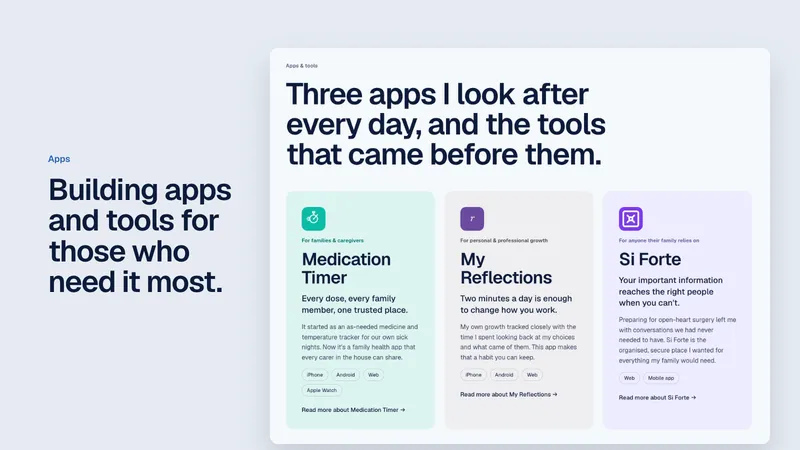
First, it no longer reflected what I spend my time on. Lately my focus has been my apps: Medication Timer, My Reflections and Si Forte. I wanted my own site to put them front and centre, not tuck them away behind years of consulting work.
Second, it had a problem of its own: nearly 2GB of travel photos sitting in the WordPress uploads folder, which I’d wanted to move to cloud storage for a while.
But working the new way got me thinking. If I was already describing changes to an AI and letting it do the building, what was the CMS actually doing for me?
The answer was: not much. I’m the only person who edits this site. I don’t need roles, plugins, a database or an admin dashboard. I needed somewhere to keep my words, my apps and my travels, and a fast way to show them.
That was the deciding factor. For my other sites, I chose to stick with WordPress, because other people may take ownership of their content one day, and a familiar dashboard matters when that happens. That isn’t the case here. This site is mine to write and mine to look after.
So I started wondering what my site would look like with no CMS at all.
Why Astro
Astro resonated with me straight away, for three reasons.
It’s fast. Astro builds plain HTML pages ahead of time. There’s no database to query and nothing to render when you visit. Pages just arrive.
It’s simple. Every article, app, trip and book on this site is now a file. Front matter at the top (title, date, category), my words underneath. If I want to know how something works, it’s in the folder.
It works beautifully with Claude and Cursor. This was the big one. Because everything is text files in a Git repository, an AI assistant can read the whole site, understand it and change it safely. Every content type has a strict schema, and nothing can be committed until a full check and build passes. If something’s wrong, the site tells us before anyone else sees it.
That last point changed how I think about a “CMS”. The editing interface is now a conversation.
Rebuilding, one piece at a time
I worked through the site in stages over two evenings, with Claude Code doing the heavy lifting and me making the calls.
Apps and projects
First came the design system, the home page, and my apps: Medication Timer, My Reflections and Si Forte. This was the heart of the rebuild. The apps now lead the home page and have their own pages, each telling the story of why I built it and who it’s for.
Behind the scenes, each app is a single file, and one number sets the order they appear everywhere.
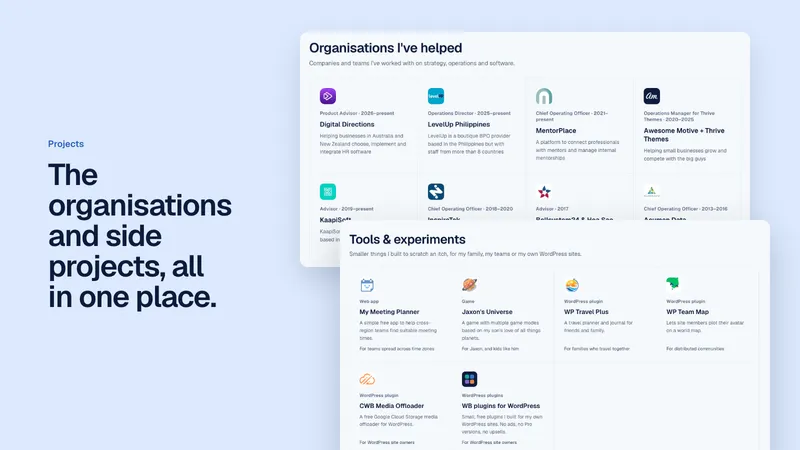
Then the projects. The organisations I’ve helped over the years each have their own page, and the smaller tools and WordPress plugins I’ve built sit under “Tools & experiments”. Plugins even get a download button that always points at the newest version, so I never have to update a link by hand again.
Articles, and syncing with my apps
Next were the articles. Every post from the old site came across with its original URL, so nothing breaks for anyone who has linked to them.
The part I’m most pleased with is the sync. Medication Timer and My Reflections each publish their own product news on their own sites. Every day, the site checks myreflections.app and medicationtimer.com for new posts and adds them to my articles list automatically.
Those posts link back to the original rather than being copied here, so the apps’ sites keep their own search traffic. Each app page shows its three latest updates, and you can filter the articles by where they’re from (my own writing, or one of the apps) and by topic.
If I want a specific post in my feed, I just ask for it.
The travel journal
Then the bit I really wanted to get right: travel.
Our family travels a lot, and I’ve always wanted a journal that keeps up with us. Not one I have to sit down at a laptop to update once we’re home and the memories have faded.
For years I’ve loved using FindPenguins for exactly that. But lately it has felt more like a burden than a joy. And more recently, I’ve become more concerned about where my important data lives, and who owns it.
If FindPenguins disappeared tomorrow, there are memories that would be lost. Photos of the boys, places we may never get back to, little moments I’d long forgotten until I scrolled past them. I didn’t want the record of our family’s travels to depend on someone else’s business.
Now it all lives in files I own, and photos in storage I control.
Every trip has its own page, with a map and every activity (a museum, a lunch, a hike) along with its photos, place, time and weather. Hundreds of activities from the old WordPress travel site came across, along with the world map of everywhere we’ve been. And those nearly 2GB of photos finally moved out of the uploads folder and into Google Cloud Storage, where every page loads a version sized for your screen.
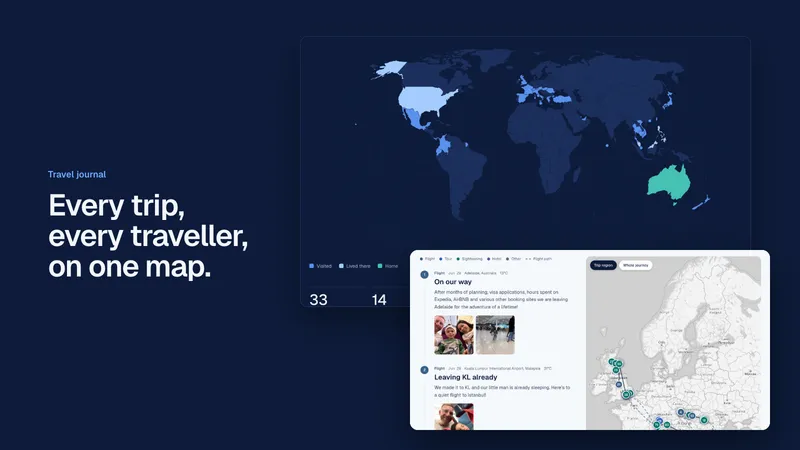
What I wanted was to update it on the fly. Take photos, tap a button, and have them turn into proper activities on the right trip, without opening a laptop.
So that’s what we built.
How I update the site now
There are two kinds of change, and they take two different routes.
Content: straight to the live site
Articles, check-ins, trips and books go live directly. I describe what I want in plain language, often from my phone, and Claude makes the change, runs the checks and commits it. The site rebuilds itself within a couple of minutes.
For travel, it looks like this:
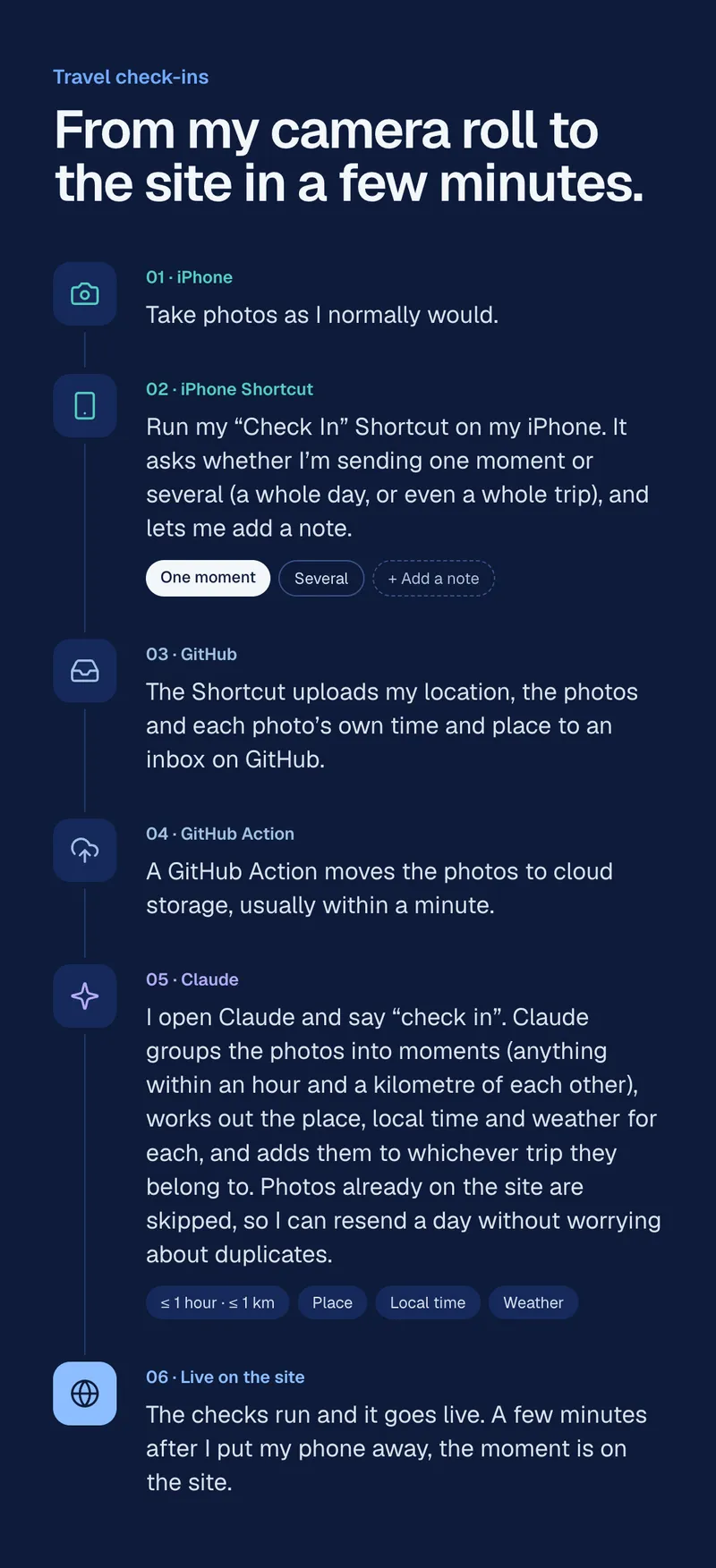
- Take photos as I normally would.
- Run my “Check In” Shortcut on my iPhone. It asks whether I’m sending one moment or several (a whole day, or even a whole trip), and lets me add a note.
- The Shortcut uploads my location, the photos and each photo’s own time and place to an inbox on GitHub.
- A GitHub Action moves the photos to cloud storage, usually within a minute.
- I open Claude and say “check in”. Claude groups the photos into moments (anything within an hour and a kilometre of each other), works out the place, local time and weather for each, and adds them to whichever trip they belong to. Photos already on the site are skipped, so I can resend a day without worrying about duplicates.
- The checks run and it goes live. A few minutes after I put my phone away, the moment is on the site.
When I want to tidy a whole trip, I ask for a trip sheet: the entire trip as plain text, one block per activity. I fix titles, add a few words, move or remove photos, then send it back. Only what I changed gets applied.
Trips can also hold check-ins back for a few days before they appear publicly, which is a small thing that gives us a bit of privacy while we’re still somewhere.
Code and design: staging first
New features, layout changes and anything structural go to a staging site first. I can preview them there for as long as I like, and when I’m happy, I release them to the live site in one step.
Content never waits on code, and code never sneaks onto the live site before I’ve seen it.
What I’ve learned
The biggest surprise wasn’t speed or simplicity, though I have both now. It was how much lighter the site feels to own.
There’s nothing to patch, no plugins to update and no admin login to protect. If something goes wrong, every change is in the history and can be undone.
And because the site is just files, my AI tools understand it as well as I do. I spend my time deciding what to say, not wrestling with how to say it.
If you’re happy with WordPress, stay happy. It’s still a brilliant platform, and I still build with it. But if you’re the only person editing your site, and you’re already working with Claude or Cursor, it’s worth asking the question I asked: what is the CMS actually doing for you?